

Features in the HITRACK 3.5 Series
The HITRACK 3.5 Series is a time-proven product offering maximum functionality for Windows desktops installations. This product is available in Desktop Edition and Enterprise Edition.
Click Here to go to the Full Version Download Center (Password Required) Click here for the User Manual |
 |
| Desktop Edition | |
| Desktop Edition is the de-facto platform of functionality for managing your EHDI data. Here are some of the great features available in this time-proven product: |
| Preferences/Settings | ||
| Access rights can be administrated by setting up users at three levels of access | ||
| Facility auto-fills and equipment settings easily configured | ||
| Physicians, screeners and audiologists can be entered and modified | ||
| Program Information Print-List to help facilitate linking with third-party screening equipment software | ||
| Nursery, language and ethnicity pick-lists can be customized | ||
| Site letter generation configuration | ||
| Required fields can be set for manual data entry | ||
| Define Facility Groups for reporting and filtering | ||
| Tracking Baby List | ||
| Easy to use browse list with appropriate result-filtering options | ||
| Infants needing inpatient screening can be easily seen | ||
| Sort-able list and find feature to locate an infant's record | ||
| The birth facility and birth date filter allow users to work with subsets of data | ||
| Screening Baby List | ||
| Helps you maintain a list of infants in the nursery who need screening | ||
| Easy to use browse list that lets you easily add results with Quick Add | ||
| Child Information | ||
| Demographic data can be entered and modified for a baby | ||
| Multiple contacts can be entered with one selected as a Primary Contact | ||
| Easy to use entry screens for: | ||
| Contacts | ||
| Screening History | ||
| Risk Indicator Assessments | ||
| Diagnostic Testing, Hearing Disposition and Audiograms | ||
| Recommendations and Amplification | ||
| Import & Merge Data | ||
| HITRACK's advanced Importer and Merger are designed to be flexible and efficient | ||
| Data from any number of HI*TRACK 3.5 databases can be aggregated and managed in a central HI*TRACK 3.5 system | ||
| Manually resolve questionable merges | ||
| Manually resolve "Unknown Codes" from screening equipment | ||
| Support for most popular screening equipment | ||
| Import and merge patient demographic data from hospital data systems | ||
| Import and merge lists of Physicians, Audiologists and Screeners from hospital data systems. | ||
| Review Merge History | ||
| Letters | ||
| Customizable letter templates in English and Spanish | ||
| Custom letters can be manually requested for a baby at any time | ||
| Letter history shows all letters generated and allows regeneration | ||
| Once a letter is processed from the Queue they can be modified prior to printing. | ||
| Reports | ||
| Baby List Reports | ||
| Inpatient Screening Report | ||
| Outpatient Screening Report | ||
| Infants with Risk Indicators | ||
| Infants with suspected Hearing Losses | ||
| Infants Needing Outpatient | ||
| Medical Record Labels | ||
| Infants Needing Diagnostics | ||
| Summary Reports | ||
| Tracking Flow Chart | ||
| State Quarterly Report | ||
| Hospital Summary Report | ||
| Screener Profile Report | ||
| EHDI Report for CDC | ||
| User defined report layouts and Custom criteria can be created and saved for later use | ||
| Easy to use filter options | ||
| General | ||
| A change log can be made in the database | ||
| Conversions from older HITRACK systems are provided free of charge with technical support if needed | ||
| Enterprise Edition | |
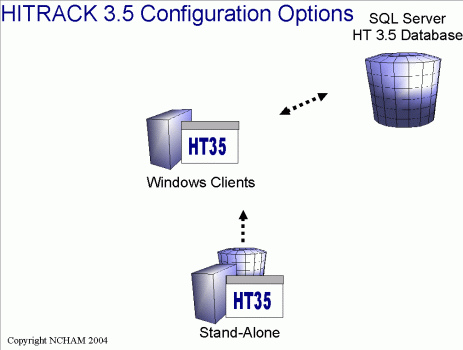
| Enterprise Edition has all of the functionality of Desktop Edition with the following differences:
|
| HITRACK Windows System Requirements |
| General |
| In most scenarios where computers are operating as "stand-alone" systems or "application only" systems the following requirements apply: |
|
| Other |
| Enterprise Edition: In scenarios where computers will be acting as HITRACK database servers IT professionals should follow Microsoft's guidelines for SQL Server 2000 installations. |
| Configuration Options |
 |